
KakaoTalk – Korea’s Most Famous Messenger
Understanding the KakaoTalk Ecosystem
KakaoTalk is far more than just a messaging application. In South Korea, it is the digital backbone of daily life. Launched in 2010, it quickly evolved from a simple text-messaging service into a comprehensive super-app that facilitates everything from banking and transportation to shopping and entertainment. For anyone living in, working in, or visiting Korea, understanding how to navigate this platform is essential. It is not an exaggeration to say that if you do not have KakaoTalk, you are effectively disconnected from the social and professional infrastructure of the country.
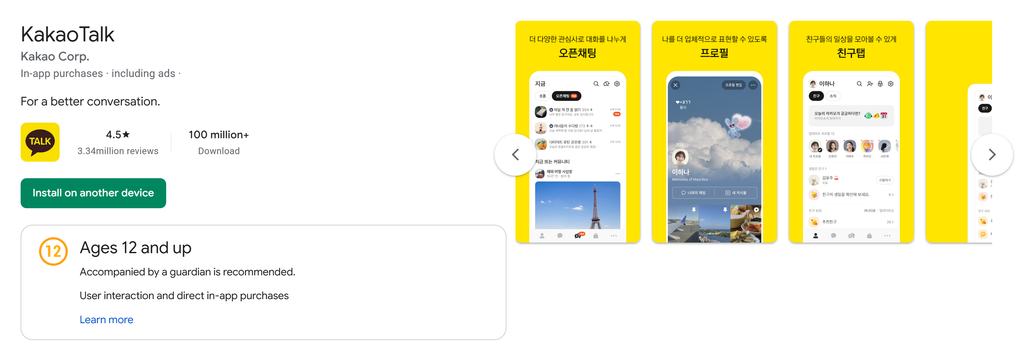
The importance of KakaoTalk lies in its ubiquity. While global messaging apps like WhatsApp or Telegram dominate in other regions, KakaoTalk maintains a near-total monopoly in the Korean market. This is because it successfully integrated local cultural nuances into its interface and features. It serves as the primary communication tool for friends, families, colleagues, and even businesses interacting with their customers. If you are planning to engage with Korean society, mastering this application is your first step toward seamless integration.
Getting Started with Installation and Setup
The installation process for KakaoTalk is straightforward, but setting it up correctly is vital to ensure you do not miss important features. The app is available on both iOS and Android platforms. Once you download the application, you will need to register using a mobile phone number. It is important to note that while you can use an international phone number to register, some features might be restricted depending on your region. However, for most users, the core messaging functions work perfectly well.
When setting up your profile, you will be prompted to create a Kakao Account. This account is the master key to the entire ecosystem. By linking your email address to your Kakao account, you ensure that you can recover your chat history and data if you lose your phone or switch devices. Many users make the mistake of skipping this step, only to find themselves unable to retrieve their contacts or message history later. Take the time to verify your email address immediately upon registration.
Once the account is set up, you will want to sync your contacts. KakaoTalk automatically finds friends who are already using the app based on the phone numbers saved in your device. You can then manage your friend list, hide contacts you do not want to see, or block users who may be sending unwanted messages. The interface is designed to be intuitive, but the sheer volume of settings can be overwhelming for new users.
Mastering the Core Communication Features
At its heart, KakaoTalk provides free text messaging, voice calls, and video calls. Unlike traditional SMS, which often incurs costs depending on your cellular plan, KakaoTalk uses data (Wi-Fi or cellular data), making it an incredibly cost-effective way to stay in touch with people, even across international borders. The voice call quality is generally high, and the group chat functionality is the primary way that Koreans organize social gatherings, work meetings, and family discussions.
One of the most beloved features of KakaoTalk is its vast library of emoticons and stickers. These are not just decorative; they are a fundamental part of the Korean communication style. In a culture that often values indirect communication, stickers allow users to convey emotions, sarcasm, or agreement without needing to type long sentences. You can purchase these stickers through the Kakao Item Store or use the free ones provided by the platform. Many of the characters, such as Ryan, Apeach, and Muzi, have become cultural icons in their own right, appearing on everything from household goods to bank cards.
Utilizing Group Chats Effectively
Group chats are the lifeblood of social interaction in Korea. Whether it is a project team at work, a group of friends planning a weekend trip, or a chatroom for your apartment complex, you will find yourself in many group chats. It is helpful to know how to manage these effectively:
- Chatroom Names: You can rename group chats to make them easier to identify. Instead of having a list of chats named with the participants’ names, name them by purpose, such as “Dinner Planning” or “Project Alpha Updates.”
- Notifications: If you are in a very active group chat, you can mute notifications for that specific room so you are not constantly interrupted while still keeping the chat accessible.
- Chatroom Settings: You can pin your most important chatrooms to the top of your list. This ensures that you never miss a message from your closest friends or your direct manager.
- Leaving Chats: You can leave a group chat at any time, but be aware that the app will notify other members that you have left.
The Super App Evolution
KakaoTalk has successfully transformed into a super-app, meaning it provides a suite of services within a single interface. This is a significant convenience factor, as it reduces the need to download dozens of individual apps for banking, shopping, or navigation. Some of the most practical extensions of the app include:
Kakao Pay and Financial Services
Kakao Pay is integrated directly into the messaging app. It allows users to send money to friends instantly, pay for goods at convenience stores, and manage bills. For expats or tourists, this is a game-changer. You can link your Korean bank account to Kakao Pay and use it to make payments via QR codes at almost every major retailer in the country. It is secure, fast, and eliminates the need to carry physical cash.
Kakao T for Transportation
Kakao T is the primary app for calling taxis, booking train tickets, and even renting electric scooters in Korea. Because it is linked to your Kakao account, the experience is seamless. You can request a taxi, track its arrival in real-time, and pay for the ride through the app, all without having to speak to a driver or exchange physical currency. This is particularly helpful for those who may not be fluent in Korean yet.
Kakao Shopping and Gift Giving
One of the most culturally significant features of KakaoTalk is the “Gift” function. You can purchase a digital voucher for a coffee, a meal, or a physical gift and send it directly to a friend’s KakaoTalk account. The recipient simply shows the barcode at the store to redeem it. This has revolutionized the way Koreans exchange gifts for birthdays, holidays, or as simple gestures of appreciation. It is a highly practical and thoughtful way to maintain relationships.
Practical Tips for International Users
If you are an international user, you might encounter some friction when using the app for the first time. Here are some expert tips to make your experience smoother:
- Language Settings: While the app is primarily in Korean, you can change the language settings to English. Go to the “More” tab, click the gear icon for settings, and select “Language.”
- Data Usage: If you are traveling and using a limited data plan, keep an eye on the auto-download settings for photos and videos. You can set the app to only download high-resolution media when connected to Wi-Fi.
- Backup Your Chats: KakaoTalk does not store your chat history on its servers for security reasons. You must manually back up your chat data to the cloud (using the KakaoTalk backup feature) before switching phones. If you fail to do this, your entire chat history will be lost.
- Security Measures: Always enable two-step verification. Given the amount of personal information linked to your Kakao account, securing it with a strong password and secondary verification is a must.
Common Misconceptions and Facts
There are many myths surrounding KakaoTalk, particularly among those who are new to the platform. Let us clarify some of these to help you use the app with confidence.
Misconception: You need a Korean phone number to use KakaoTalk.
Fact: While having a Korean number unlocks the full range of features like Kakao Pay and Kakao T, you can register and use the messaging functions with an international number. You will still be able to chat, send photos, and join group chats without a Korean SIM card.
Misconception: KakaoTalk is only for social messaging.
Fact: In Korea, KakaoTalk is a standard professional tool. It is common for bosses to assign tasks or for colleagues to coordinate projects through the app. Do not be surprised if you are invited to a work-related group chat. It is the expected norm, not an invasion of privacy.
Misconception: All services in the Kakao ecosystem are free.
Fact: While the messaging app itself is free, many of the integrated services, such as Kakao T or certain premium emoticons, cost money. Always check the payment terms before confirming a transaction within the app.
Managing Professional Boundaries
Because KakaoTalk is used for both personal and professional communication, maintaining a boundary can be difficult. Many Koreans struggle with the feeling of being “always on” because their boss can reach them at any hour of the day. If you are working in Korea, it is wise to establish clear communication habits. For example, if you prefer not to receive work messages after a certain hour, you can politely inform your team or simply mute the work-related chatroom during your off-hours.
Additionally, be mindful of the “read” icon. In KakaoTalk, messages show a small number next to them, indicating how many people have not yet read the message. Once everyone has read it, the number disappears. This can sometimes cause social pressure, as people might expect an immediate reply once they see that you have read their message. If you need time to respond, it is often better to avoid opening the chat until you are ready to engage.
Advanced Features for Power Users
Once you are comfortable with the basics, there are several advanced features that can save you significant time and effort. Exploring these settings can make the app feel like a personalized assistant.
Open Chats
Open Chats are group conversations where you can join based on interests rather than existing phone contacts. This is a great way to meet people who share your hobbies, such as language exchange groups, hiking clubs, or local community forums. You can join these chats using a pseudonym, which protects your privacy while allowing you to participate in community discussions.
KakaoTalk PC Version
Many users do not realize that there is a desktop version of KakaoTalk. This is incredibly useful for office work. You can sync your PC version with your mobile app, allowing you to type long messages quickly using a keyboard and easily transfer files between your phone and computer. The PC version is highly secure and offers the same features as the mobile app, making it an essential tool for those who spend a lot of time at a desk.
Message Scheduling and Reminders
While the native app is constantly updating, many users utilize third-party integrations or the built-in “Talk Drawer” feature to manage their information. The Talk Drawer allows you to organize your photos, files, and links in one place, acting as a cloud storage solution specifically for your chat history. This makes it much easier to find that important document your colleague sent three weeks ago.
The Role of KakaoTalk in Korean Culture
To truly understand KakaoTalk, one must look at the cultural context of South Korea. The country has one of the highest smartphone penetration rates in the world, and there is a strong emphasis on speed and efficiency in communication. KakaoTalk fits this cultural demand perfectly. It is fast, reliable, and keeps everyone connected in a society that values collective action and staying updated.
The ubiquity of the app has even influenced the Korean language. You will often hear people say “Kakao me,” which essentially means “send me a message on KakaoTalk.” The app has become a verb, much like “Google” or “Zoom” in other parts of the world. Understanding this cultural integration helps you appreciate why the app is so pervasive. It is not just software; it is the digital manifestation of Korean social dynamics.
Troubleshooting Common Issues
Even with a robust platform like KakaoTalk, users occasionally run into technical hurdles. Here are solutions to the most common problems:
- Login Failures: If you cannot log in, ensure your internet connection is stable. If you have changed your phone number, you may need to update your account information in the settings before migrating to a new device.
- Message Delivery Issues: If your messages are not sending, check if you have inadvertently turned on “Airplane Mode” or if your data limit has been reached. Sometimes, simply restarting the app resolves minor sync issues.
- Storage Full: Since KakaoTalk stores a lot of media, your phone’s storage might fill up quickly. Go to the “Chatroom Settings” and use the “Clear Cache” feature to free up space without deleting your actual message history.
- Account Hacking: If you suspect your account has been compromised, change your password immediately and check the “Connected Devices” list in your settings to log out of any sessions you do not recognize.
Cost Effective Utilization Strategies
For those looking to get the most out of the platform without spending unnecessary money, consider the following strategies:
- Stick to Free Emojis: While paid stickers are fun, the app provides a solid selection of free stickers that are more than sufficient for daily use.
- Use Wi-Fi for Media: Avoid downloading large video files or high-definition photos while using cellular data, especially if you are on a roaming plan.
- Utilize the “Gift” Shop Sales: Occasionally, the Gift store offers discounts or promotional deals. If you are planning to send a gift, check the “Events” tab to see if there are any ongoing promotions.
- Avoid Third-Party “Unlock” Services: Never pay for third-party services that claim to unlock premium features or provide “hacked” versions of the app. These are often scams that can lead to your account being banned or your personal information being stolen.
The Future of the Kakao Ecosystem
As technology continues to evolve, KakaoTalk is moving toward incorporating more artificial intelligence and automated services. We are already seeing the integration of chatbots that can help with customer service, booking appointments, and even providing basic health information. For the average user, this means that the app will become even more capable of handling complex tasks with minimal input.
The focus on AI will likely lead to smarter notification systems, where the app learns your schedule and suggests when to mute certain groups or prioritize specific messages. For international users, the potential for real-time translation within chatrooms is an exciting prospect that could bridge the language gap even further, making it easier for foreigners to interact with local businesses and individuals.
Final Thoughts on Becoming a Power User
Becoming a proficient KakaoTalk user is a journey. Start by mastering the basic messaging and profile settings, then gradually explore the integrated services like Kakao Pay and Kakao T. By understanding how to manage your notifications, secure your account, and utilize the various features, you will find that the app is an incredibly powerful tool that makes navigating life in Korea significantly easier.
Remember that the app is designed to be user-friendly, so do not be afraid to explore the settings menu and experiment with different features. If you are ever unsure about a function, the official Kakao support website offers extensive documentation in both Korean and English. With millions of people using the platform every single day, you are joining a vast community that relies on this digital infrastructure to bridge the gap between their personal and professional lives. Embrace the convenience, stay mindful of your digital boundaries, and enjoy the seamless connectivity that KakaoTalk provides.
Navigating Privacy and Security Settings
In an age where data privacy is a top concern, it is important to know how to manage what you share on KakaoTalk. The app provides several layers of security that allow you to control who can find you and what information they can see.
One of the most important settings is the “Privacy” section. Here, you can control whether your profile is visible to people who are not in your contact list. You can also disable the “Auto-add Friends” feature if you do not want the app to automatically import every contact from your phone. This is particularly useful if you have a mix of personal and professional contacts and want to keep your circles separate.
Another critical feature is the “Secret Chat” mode. This provides end-to-end encryption for your messages, ensuring that only you and the recipient can read them. While standard chats are secure, Secret Chat adds an extra layer of protection, which is ideal for discussing sensitive information, such as financial details or private personal matters.
Lastly, be cautious about the information you post on your “Profile” or “Story.” Just like any other social media platform, everything you share can be seen by those on your friend list. If you are concerned about your digital footprint, it is best to keep your profile information minimal and review your privacy settings periodically to ensure that only the people you trust have access to your updates.
Optimizing the User Experience for Daily Efficiency
To truly optimize your daily efficiency, think of KakaoTalk as your personal digital assistant. Instead of using multiple apps to manage your day, try to consolidate your activities within the Kakao ecosystem where possible. For instance, if you are planning a dinner with friends, use the “Kakao Map” integration to share the location, “Kakao T” to book the taxi, and “Kakao Pay” to split the bill.
The “Talk Drawer” is another tool that should not be overlooked. By regularly organizing your chats and saving important files in the Drawer, you avoid the frustration of scrolling through months of messages to find a specific piece of information. This proactive approach to data management turns a simple messaging app into a robust personal knowledge base.
Finally, consider the notification settings. Many people find themselves distracted by constant pings. By customizing your notification sounds for different types of messages—such as a distinct sound for work-related chats versus personal ones—you can train yourself to react only when necessary. This level of customization is what separates a casual user from a true power user who uses the app to enhance their productivity rather than letting it become a source of constant interruption.
Community Engagement and Social Etiquette
While KakaoTalk is a technological platform, it is governed by the social norms of Korean culture. Understanding these norms will help you avoid social faux pas and make your interactions more pleasant.
In Korea, there is a certain level of expected politeness in digital communication. For example, when messaging someone you do not know well, or someone who is senior to you, it is polite to use formal language. Even in casual group chats, showing respect for others’ time and avoiding spamming the chat with unnecessary messages is appreciated. If you are in a group with people you do not know well, observe how they interact for a while before jumping in with lots of messages or stickers.
Additionally, recognize that the “Gift” feature is not just about the transaction; it is a way to maintain social bonds. Sending a small gift, like a coffee voucher, on someone’s birthday or as a thank-you for a favor is a standard social practice. It is a gesture of goodwill that goes a long way in building and maintaining relationships in the Korean context.
By approaching KakaoTalk with both technical knowledge and cultural awareness, you will find that it is not just an app, but a gateway to better understanding and participating in the vibrant society of South Korea. Whether you are a resident or just visiting, the insights provided here will help you navigate the platform with ease, efficiency, and cultural sensitivity.
Master






댓글 0
첫 댓글을 남겨보세요.