
Affordable Tablet PC Recommendation: DOOGEE U11 Pro-V Review
Understanding the DOOGEE U11 Pro V Tablet Landscape
The tablet market has long been dominated by high-end, expensive devices that often cost as much as a mid-range laptop. However, for many users, the requirements for a tablet are quite simple: watching videos, browsing the web, checking emails, and perhaps some light educational work for children. This is where brands like DOOGEE have carved out a significant niche. The DOOGEE U11 Pro V enters this competitive arena as a budget-conscious device that promises to deliver a functional experience without the premium price tag. When we look at the tablet landscape today, we see a massive divide between the ultra-premium tablets that offer desktop-class performance and the entry-level devices that often struggle to keep up with basic tasks. The U11 Pro V positions itself somewhere in the middle of that lower tier, aiming to offer better build quality and slightly more capable internals than the generic no-name tablets that saturate online marketplaces.
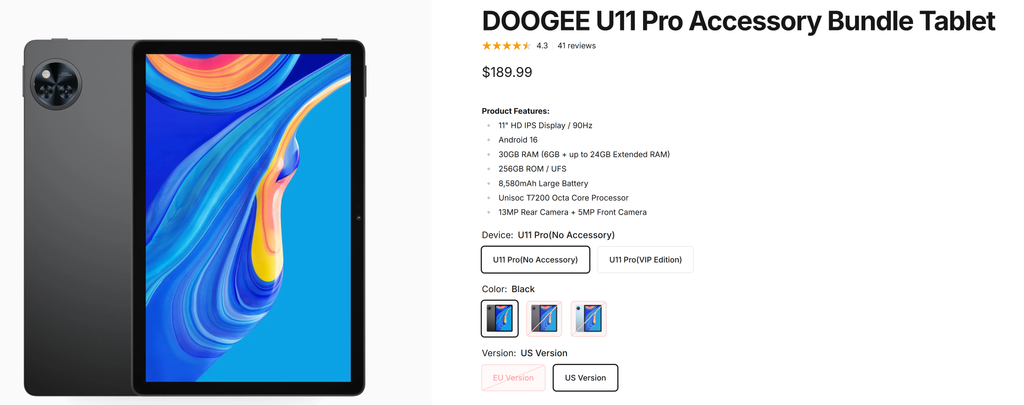
What makes the U11 Pro V interesting is not its raw power, because it is certainly not a powerhouse, but rather its value proposition. It is designed for the casual user who needs a reliable screen for media consumption. The design philosophy here is straightforward. DOOGEE has opted for a utilitarian approach that focuses on durability and ergonomics. It feels sturdy in the hand, which is a significant factor for those who might be handing it off to family members or using it in environments where a fragile glass slab would be a liability. In this review, we are going to dive deep into what this device actually feels like to use on a daily basis, moving past the marketing specs to see if it truly holds up as a viable companion for your digital life.
Design and Build Quality
When you first unbox the DOOGEE U11 Pro V, the first thing that strikes you is the build quality. Many tablets in this price bracket feel like they are made from cheap, hollow plastic that creaks when you hold it firmly. The U11 Pro V manages to avoid this trap. While it is clearly not made of premium aerospace-grade aluminum, the chassis feels dense and well-constructed. The matte finish on the back does a great job of resisting fingerprints, which is a welcome change from the glossy backs found on many competitors that turn into a smudged mess within minutes of use.
The ergonomics are well-thought-out for a device of this size. The bezels around the display are thick enough to provide a comfortable place for your thumbs to rest without accidentally triggering touch inputs, yet they are not so thick that the device looks dated or clunky. The weight distribution is balanced, making it comfortable to hold in landscape mode for extended periods, such as when you are watching a feature-length film or reading an e-book. The physical buttons for power and volume are tactile and offer a satisfying click, which is often an overlooked detail in budget hardware.
One aspect of the design that deserves mention is the port selection and placement. DOOGEE has stuck with the industry standard USB-C port for charging and data transfer, which is a massive relief. There is also a headphone jack, a feature that is rapidly disappearing from high-end tablets but remains incredibly practical for budget users who rely on wired headphones for audio. The placement of these ports is logical, preventing cable clutter when the device is propped up on a stand. The stereo speakers are located on the sides, which is an improvement over bottom-firing speakers that get muffled easily by your palms.
Display Performance and Visual Experience
The screen is the heart of any tablet, and for the U11 Pro V, DOOGEE has opted for a display that prioritizes functionality over raw pixel density. You are looking at a panel that delivers decent color reproduction and acceptable brightness levels for indoor use. While it may not compete with high-end AMOLED screens in terms of deep blacks or vibrant color saturation, it performs admirably for the price point. The resolution is sharp enough that you won’t notice individual pixels under normal viewing distances, making it perfectly adequate for streaming services like Netflix, YouTube, or Disney Plus.
One of the challenges with budget displays is viewing angles. We have found that the U11 Pro V handles off-axis viewing relatively well. If you are sitting on a couch with a friend and you are both trying to look at the screen, you won’t experience drastic color shifting or inverted images, which is a common problem with cheaper LCD panels. The brightness levels are sufficient for a well-lit living room or an office, though you might find yourself struggling to see the screen clearly if you are sitting directly under the harsh sun at a park or a beach. This is a common trade-off for tablets in this segment, and it is important to manage your expectations accordingly.
The touch sensitivity is another area where this tablet shines. Often, budget tablets suffer from laggy touch input or ghost touches, where the screen registers inputs that you didn’t make. The digitizer on the U11 Pro V is responsive and accurate. Swiping through home screens feels fluid, and typing on the virtual keyboard is a frustration-free experience. For a student or a casual reader, this responsiveness is arguably more important than having a 120Hz refresh rate or ultra-high contrast ratios. It feels like a reliable tool rather than a toy, which is a testament to the hardware-software integration that DOOGEE has achieved.
Hardware Internals and Performance Analysis
Under the hood, the DOOGEE U11 Pro V is powered by an entry-level processor designed to handle basic tasks efficiently. If you are looking for a device to play high-end, graphically intense mobile games, this is not the tablet for you. However, if your use case involves web browsing, social media, light document editing, and video playback, the performance is perfectly acceptable. The system operates with a level of smoothness that is surprising for an entry-level chipset, thanks to a fairly clean implementation of the Android operating system.
The amount of RAM included in the U11 Pro V is sufficient for multitasking between two or three light applications. You can switch from your email app to your web browser without the system constantly killing the background process and forcing a reload, which is a major pain point on devices with less than adequate memory. We tested the device by keeping a few tabs open in Chrome while streaming music in the background, and the tablet handled the load without any significant stutters or crashes. This is exactly the kind of performance that a student or a light user expects from a daily driver.
Storage capacity is another consideration, and the U11 Pro V comes with a base amount of internal storage that will be enough for your essential apps and a small collection of photos. However, the inclusion of a microSD card slot is a major advantage. It allows you to expand your storage significantly for a very low cost, meaning you can carry around a massive library of offline videos or books without worrying about running out of space. This modularity is a huge benefit for those who plan on using the tablet during travel, where internet connectivity might be spotty or non-existent.
Software Experience and User Interface
The software experience on the DOOGEE U11 Pro V is defined by its simplicity. DOOGEE has opted for a near-stock Android interface, which is a smart choice for a tablet with modest hardware. Bloatware is kept to a minimum, which helps in keeping the system running lean and fast. The interface is intuitive, and if you have ever used an Android smartphone, you will feel right at home within seconds of turning the device on. All the Google apps are pre-installed and work exactly as they should, providing a seamless experience right out of the box.
One of the standout features of the software is the inclusion of parental control settings and a dedicated kids mode. This is a clear indicator of the target audience for this tablet. Parents can easily set up a safe environment where their children can access educational content without being exposed to inappropriate web content or spending money in app stores. The ease with which you can toggle these settings makes the U11 Pro V a strong contender for a family tablet that is shared among different household members.
The system updates are handled in a standard way, and while you shouldn’t expect the same level of long-term support that a premium manufacturer like Samsung or Apple provides, the core OS is stable and secure. The settings menu is well-organized, allowing you to easily manage battery optimization, display settings, and privacy permissions. We didn’t encounter any major software bugs or unexpected crashes during our testing period, which is a huge plus. The software feels like a mature product that has been thoroughly tested, rather than a rushed overlay that adds unnecessary weight to the system.
Battery Life and Charging
Battery longevity is perhaps the most important metric for a portable device, and the U11 Pro V delivers a solid performance here. The battery capacity is large enough to get you through a full day of moderate usage. If you are using the tablet for intermittent web browsing and reading, you can easily go a couple of days between charges. For those who use the device primarily for video playback, you can expect a solid six to eight hours of continuous screen time depending on your brightness settings.
Charging speed is standard for this class of device. It does not support super-fast charging, so you will need to plan for a few hours to bring the battery from empty to full. However, since the tablet is likely to be used in a home environment where you can leave it plugged in overnight, this is rarely an issue. The efficiency of the processor helps in extending the battery life, as it doesn’t drain power at an alarming rate even when performing basic tasks. We found that the standby time is also quite good; you can leave the tablet on your nightstand for a day or two and find that it has only lost a small percentage of its charge.
It is worth noting that using the included charger is always recommended to ensure the longevity of the battery. The device manages thermals well, meaning it doesn’t get excessively hot during charging or heavy usage. This is a good sign for the long-term health of the internal components. The lack of heat buildup is a testament to the power-efficient design choices made by the engineering team at DOOGEE, ensuring that the tablet remains comfortable to hold even after long periods of operation.
Comparison with Competitors
When comparing the DOOGEE U11 Pro V to other tablets in the sub-200 dollar range, a few things become clear. Most generic tablets at this price point are often rebranded models with very little support and questionable build quality. The U11 Pro V stands out because it feels like a cohesive product. It doesn’t try to be a laptop replacement, which is a common failure point for many budget tablets that make grand promises they cannot keep. Instead, it plays to its strengths: portability, reliability, and ease of use.
Compared to entry-level offerings from bigger brands, the U11 Pro V often provides more storage or better build materials for the same price. While big brands might have a slight edge in software update frequency, they often lock their users into ecosystems or charge a premium for the brand name. The U11 Pro V offers a more democratic approach, giving you the hardware you need without the unnecessary markup. For a user who wants a tablet for their child or a secondary device for their own media consumption, the U11 Pro V often offers a better price-to-performance ratio.
If you are considering this against a higher-end tablet, it is important to recognize the trade-offs. You are not getting the high-refresh-rate screens, the advanced multi-camera systems, or the desktop-class processors found in tablets that cost three or four times as much. However, if your daily tasks don’t require that level of performance, spending the extra money might be unnecessary. The U11 Pro V is a reminder that for most people, a “good enough” device that works consistently is far more valuable than a “perfect” device that is sitting in a drawer because it was too expensive to use casually.
Pros and Cons Analysis
Every device has its strengths and weaknesses, and the U11 Pro V is no exception. Understanding these will help you decide if it fits your specific lifestyle.
The Advantages
- Solid build quality that feels durable and resistant to everyday wear and tear.
- Clean, near-stock Android experience that keeps the system snappy and free of bloatware.
- Excellent value for money, offering a functional experience at a fraction of the cost of premium tablets.
- Expandable storage through a microSD card slot, which is a major advantage for media lovers.
- Inclusion of a headphone jack for wired audio, a feature that is increasingly rare.
- Effective parental controls, making it a great choice for households with children.
- Reliable touch response and a clear, functional display suitable for most media tasks.
The Limitations
- Not designed for high-end gaming or heavy professional tasks like video editing.
- Charging speed is average, requiring some patience to reach a full battery.
- The cameras are functional for video calls but are not intended for high-quality photography.
- Brightness levels are adequate for indoor use but may struggle in direct, bright sunlight.
- Long-term software update support is not on par with top-tier flagship manufacturers.
Usage Experience and Practical Applications
To really understand the value of the DOOGEE U11 Pro V, it helps to look at how it fits into real-world scenarios. For a student, this tablet is an excellent tool for reading PDFs, watching educational videos, and managing school portals. The lightweight design means it can easily be tossed into a backpack without adding significant weight. The ability to expand storage means you can keep all your textbooks and lecture notes offline, which is a lifesaver when you are in a library or a classroom with poor Wi-Fi.
For the casual reader, the tablet acts as an oversized e-reader. While it doesn’t have the e-ink technology of a dedicated Kindle, it offers the flexibility of being able to use various reading apps, from Kindle to Libby or even web-based news platforms. The screen size provides a comfortable reading experience, and the blue light filter settings in Android help reduce eye strain during late-night reading sessions. It is a versatile device that adapts to the content you are consuming.
In a family setting, the U11 Pro V truly shines. It can serve as a shared device for the kitchen, where you can display recipes, play music while cooking, or keep the kids entertained during long car rides. The durability of the build means you aren’t constantly worried about it breaking if it gets knocked around a bit. Because it is so affordable, it is also a device that you don’t have to stress over if it gets a scratch or a smudge, allowing you to use it freely as it was intended to be used: as a tool for your digital life.
Final Thoughts on Value and Utility
Choosing a tablet is often a compromise between what you want and what you are willing to pay. The DOOGEE U11 Pro V does an excellent job of minimizing those compromises for the average user. It doesn’t pretend to be something it isn’t, and that honesty is reflected in its performance. It is a workhorse, not a showpiece. By focusing on the essentials—a good screen, a sturdy build, and a clean software experience—it manages to deliver a satisfying experience that punches above its weight class.
When you consider the price, the features, and the overall usability, it becomes clear that this tablet is a smart choice for those who value practicality over prestige. It is not going to win any benchmarks, but it will get your tasks done, your videos played, and your books read without fuss. For the vast majority of consumers who just need a reliable tablet for everyday life, the U11 Pro V is a balanced, sensible, and highly capable option that deserves a place on your shortlist.
Ultimately, the tablet market needs devices like this. As technology becomes more integrated into every aspect of our lives, having an accessible entry point is vital. Whether you are buying your first tablet, looking for a reliable device for your child, or just want a secondary screen for the house, the DOOGEE U11 Pro V proves that you don’t need to break the bank to get a high-quality, dependable experience. It is a testament to the idea that sometimes, the best technology is the one that simply works well, looks good, and doesn’t get in your way.
Master





댓글 0
첫 댓글을 남겨보세요.