
An app that translates English into Korean
Overview of Papago for English to Korean Translation
When it comes to translating English into Korean, one name consistently rises above the rest: Naver Papago. Developed by the South Korean internet giant Naver, Papago is specifically engineered to handle the nuances of the Korean language, which is notoriously difficult for general-purpose translators to capture accurately. Unlike western-centric translation tools that often rely on a one-size-fits-all approach, Papago utilizes a neural machine translation (NMT) engine that has been fine-tuned on an immense corpus of Korean-specific linguistic data. This makes it the gold standard for anyone needing to bridge the gap between English and Korean, whether for business, travel, or casual conversation.
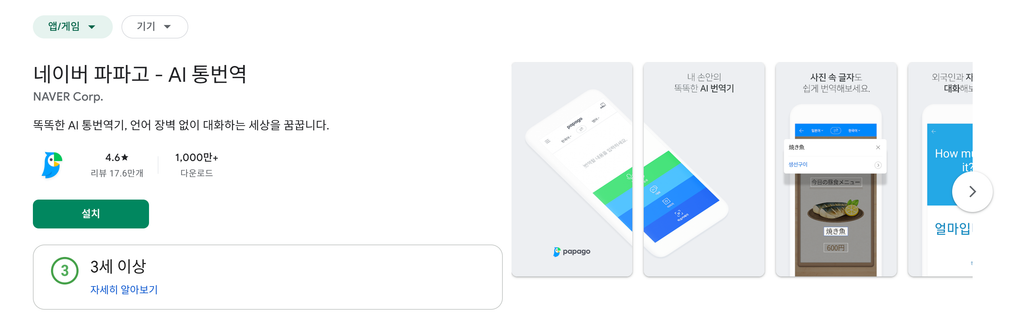
Basic Information
| Item | Details |
|---|---|
| Category | Productivity and Education |
| Homepage | https://papago.naver.com |
| Operating System | iOS, Android, Windows, macOS, Web Browser |
| Developer | Naver Corporation |
| Language | Multi-language support with primary focus on Korean, English, Japanese, and Chinese |
| Size | Approximately 150 MB (varies by device) |
Performance Information
| Item | Usage |
|---|---|
| CPU Usage | Low to moderate during text input; spikes during voice or image processing |
| Memory Usage | Typically consumes 100MB to 300MB of RAM depending on active features |
| Disk Usage | Requires 200MB to 500MB for offline model storage and cache |
| Network Usage | High for real-time translation; negligible for offline mode |
Download and Installation Guide
- Step 1: Visit the official App Store or Google Play Store on your mobile device, or navigate to the official Papago website on your computer.
- Step 2: Type Papago in the search bar. Look for the icon featuring a green parrot, which is the official branding for the application.
- Step 3: Click the Install or Get button. If you are on a desktop browser, you can bookmark the website for quick access without needing to install a standalone application.
- Step 4: Once the download completes, open the application. You will be prompted to grant permissions for the microphone and camera, which are essential for voice and image translation features.
- Step 5: Select your source language as English and your target language as Korean. You are now ready to begin translating.
Key Features
- Neural Machine Translation Engine: Papago leverages advanced deep learning models that move beyond word-for-word substitution. It understands context, idiomatic expressions, and honorifics, which are critical in Korean culture. By analyzing the entire sentence structure, the AI ensures that the output sounds natural to a native speaker rather than like a robotic transliteration.
- Image Translation Capability: One of the most powerful features is the ability to translate text from images. By using your phone camera, you can point at a Korean menu, street sign, or document, and the app will overlay the English translation directly onto the screen. This is an indispensable tool for travelers who need to understand their surroundings in real-time.
- Voice Translation for Real Time Conversations: The app includes a highly responsive voice-to-voice translation feature. You can speak into your phone in English, and the app will instantly translate it into spoken Korean. It also features a conversation mode where two people can speak in their respective languages, and the app handles the back-and-forth translation seamlessly.
- Honorifics Toggle: Korean language distinguishes between formal and informal speech (Jondaemal vs. Banmal). Papago provides a unique toggle that allows users to adjust the politeness level of the output. This is a game-changer for learners who want to ensure they are using the appropriate level of respect when speaking to superiors or strangers.
- Offline Translation Mode: For users traveling to areas with poor network connectivity, Papago allows for the downloading of language packs. Once downloaded, you can translate text and images without needing a cellular data or Wi-Fi connection, ensuring that you are never stranded without translation help.
User Reviews and Ratings
Papago consistently maintains high ratings across all major app stores, typically holding a 4.7 to 4.9-star average. Users frequently praise the app for its superior accuracy compared to global competitors like Google Translate. Many long-term learners of the Korean language note that the vocabulary suggestions are more contextually relevant to modern Korean society. The most common positive feedback revolves around the image translation feature, with travelers claiming it saved them from difficult situations in restaurants and public transportation hubs. However, some users mention that the app can be slightly slower to load on older devices, and a small subset of users have requested more comprehensive offline dictionary features to accompany the translation tool.
Pros and Cons Analysis
Pros
- High Linguistic Accuracy: Because the developer is a Korean company, the quality of Korean translation is unmatched. The app understands slang, modern internet terminology, and cultural nuances that other translators often miss.
- Excellent User Interface: The design is minimalist and intuitive. Users can switch between text, voice, and image modes with a single tap, and the history feature makes it easy to revisit previously translated phrases.
- Cultural Context Awareness: The inclusion of an honorifics toggle is a massive advantage. It teaches users the social structure of the Korean language while preventing the common social faux pas of using casual language with superiors.
Cons
- Regional Optimization: While it is excellent for English to Korean, its performance in other language pairs can occasionally be less robust compared to global competitors that have broader training data for other languages.
- Resource Intensive: On older smartphones, the app can consume significant battery life when using the live camera translation feature for extended periods. Users are advised to keep a power bank handy during long days of travel.
- Limited Desktop Features: While the web version is functional, the mobile application offers a much deeper set of features. Users who primarily work on computers might find the web interface slightly less convenient than the mobile counterpart.
Deep Dive into Technical Architecture
The success of Papago stems from its architecture, which relies on the Transformer model, a deep learning architecture that has revolutionized natural language processing. By utilizing an attention mechanism, the software can weight the importance of different parts of the input sentence, regardless of their distance from each other. This is particularly vital for Korean, where the verb is almost always placed at the end of the sentence. Traditional translators often struggle with this reversal, but Papago’s neural network anticipates the grammatical structure of Korean throughout the entire translation process.
Furthermore, Naver has integrated extensive user feedback loops into their machine learning pipeline. Every time a user corrects a translation or chooses an alternative provided by the app, that data helps refine the model. This continuous learning cycle means that the app is getting smarter every day. It is not just a static dictionary; it is a living, breathing linguistic engine that evolves alongside the Korean language, which itself is constantly changing due to the influence of social media and global pop culture.
Practical Applications for Daily Life
For those living in Korea or interacting with Korean speakers, the utility of this app extends far beyond simple text conversion. Many users employ the app to navigate complex administrative tasks. For instance, when dealing with Korean banking apps or government websites that might not have full English support, users can take screenshots and upload them to Papago to understand the necessary steps. This effectively lowers the barrier to entry for foreigners attempting to navigate the Korean digital ecosystem.
In a business setting, the app serves as a silent assistant. During meetings where Korean is the primary language, the voice translation feature can be used to capture the gist of the conversation. While it may not replace a professional human interpreter for high-stakes legal or medical negotiations, it is more than sufficient for everyday office communication, project coordination, and casual networking. The ability to save frequently used phrases to a favorites folder also allows professionals to quickly access standardized business Korean without needing to re-type or re-translate the same information repeatedly.
Comparison with Other Translation Services
When comparing Papago to other industry leaders, the primary differentiator is the localization focus. Google Translate is a master of breadth, covering hundreds of languages with acceptable accuracy. However, Papago is a master of depth. If you are comparing a translation of a complex Korean sentence involving multiple clauses, Papago will almost always provide a more natural-sounding result. It avoids the literal translation traps that often make sentences sound awkward or grammatically incorrect in Korean.
Another point of comparison is the user experience design. Naver has tailored the interface to meet the aesthetic and functional expectations of Asian app markets, which tend to prefer dense, feature-rich interfaces that provide many options at once. In contrast, Western apps often prioritize extreme simplicity. Depending on the user’s preference, Papago’s wealth of buttons and settings can either be seen as a feature-rich powerhouse or a slightly cluttered experience. However, most users quickly adapt to the layout, as the most important buttons are always located in the most ergonomic positions on the screen.
Future Outlook for Language Translation
As we look toward the future, it is clear that Papago will continue to integrate more sophisticated AI technologies. We are already seeing the early stages of augmented reality (AR) integration, where the phone camera does not just show a translated image, but replaces the text on the screen with the translated text in a font and style that matches the original. This is the next frontier for translation apps, effectively removing the language barrier by making the world look as if it were written in your native language.
Additionally, as generative AI models become more common, we can expect Papago to offer more nuanced “tone of voice” adjustments. Instead of just “polite” or “casual,” future iterations might allow users to select “academic,” “legal,” “romantic,” or “persuasive” tones. This will allow for even more precise communication, ensuring that the intent behind the words is conveyed just as accurately as the literal meaning. The trajectory for this application is clearly toward a complete, real-time, invisible translation experience that will make the physical distance between languages feel non-existent.
Conclusion for Prospective Users
Whether you are a student of the Korean language, a business professional, or a curious traveler, Papago stands as an essential tool. Its commitment to the specific needs of the Korean language, combined with its robust feature set and constant technical updates, makes it the most reliable choice in the current market. By removing the friction of language, it opens doors to new cultures, deeper professional connections, and a smoother experience in one of the world’s most vibrant, yet linguistically distinct, nations.
It is worth noting that while the app is highly effective, it is always wise to use it as a supplement to language learning rather than a complete replacement. The nuances of human expression are vast, and the most rewarding experiences often come from the small misunderstandings that occur when we attempt to speak a new language ourselves. However, when you need to be precise, when you need to be understood, and when you need to understand, Papago is the best partner you can have in your pocket.
Accessibility and Inclusivity
One aspect of Papago that often goes overlooked is its commitment to accessibility. The application includes various features designed to assist users with visual or auditory impairments. For example, the text-to-speech engine is remarkably clear and human-like, which is helpful for visually impaired users who need to understand written documents. Similarly, the ability to read back the Korean translation allows users to practice their pronunciation, which is a key component for those who are hearing impaired or learning to speak the language through visual feedback.
The developers have also ensured that the font sizes and contrast ratios within the app are adjustable, making it easier for older users or those with limited vision to interact with the interface. In an increasingly digital world, these considerations are not just “nice to have”—they are essential. By making their platform accessible to a wider range of users, Naver has solidified Papago’s position as a truly universal tool for communication.
Privacy and Data Security Considerations
In an era where data privacy is paramount, users are right to be concerned about how their translation data is handled. Naver has implemented strict data protection policies, ensuring that user translations are encrypted and handled with care. While the app does collect usage data to improve its machine learning models, users have the option to manage their privacy settings and delete their history. It is a best practice to avoid inputting highly sensitive, classified, or personal information into any cloud-based translation service, but for general day-to-day use, Papago provides a secure and reliable environment.
The company also provides clear documentation regarding what data is collected and how it is used, which is a sign of transparency that is often missing from smaller, less established translation apps. By maintaining this level of corporate responsibility, Naver keeps the trust of its millions of users, which is perhaps the most important asset for any service that handles personal communication.
Community and Support
Beyond the app itself, there is a vibrant community of users who share tips, tricks, and best practices for using Papago. Online forums and social media groups dedicated to learning Korean are filled with discussions about how to get the most out of the app. Whether it is a discussion on how to best translate a complex legal term or a thread about the best way to use the camera translation feature to read old, handwritten signs, the collective knowledge of the user base is a valuable resource.
Naver also provides a robust support system, including a comprehensive FAQ section and a direct feedback channel within the app. If a user discovers a translation error or a bug, they can report it directly to the development team. This feedback is treated seriously, and many of the improvements seen in recent updates are a direct result of user input. This collaborative relationship between the developer and the community is what keeps Papago ahead of the curve and ensures that it remains the most trusted name in English-to-Korean translation.
Master





댓글 0
첫 댓글을 남겨보세요.